
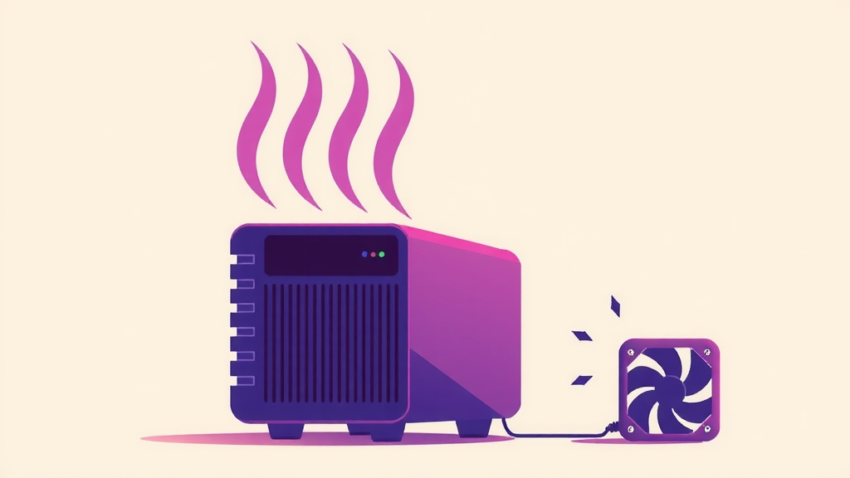
The Minisforum MS-01 runs hot. Anyone who owns one will tell you that. Forums, Reddit, YouTube — the advice is always the same: repaste, undervolt, or deal with it. Repasting means tearing down the whole system. Undervolting is a BIOS dance that may or may not stick across reboots. Neither is what you would call a casual afternoon project.
It’s something I’ll do some day, but I’m always for something that might be a cheap and cheerful fix. I bought a dual USB cooling fan for a few dollars — the kind sold for cooling routers, modems, and laptop screens. The kind you’d find on TikTok. Five dollars, two fans, a USB cable. Not exactly precision engineering.
Before the fan: 75.5°C under light load. After: a steady 60°C. That is a 15.5°C drop for the price of a takeout coffee.
Why the MS-01 Runs Hot
The MS-01 packs desktop-class hardware into a small form factor. The catch is thermal density — there is a lot of heat in a tight space, and the case itself gets hot. Under sustained load, the CPU throttles. Not catastrophically, but enough that you will see it in benchmarks or long-running tasks.
Minisforum own product pages list the MS-01 as supporting PCIe bifurcation, which is part of the appeal — you can slot in a GPU or additional storage. That flexibility comes with a thermal cost. The case that makes it all fit is also the thing trapping the heat.
Most solutions online focus on the CPU itself: better thermal paste, undervolting, bigger coolers. These work, but they are invasive. You open the machine, clean surfaces, apply new compound, reassemble. One afternoon, minimum. And if you mess up the paste job, you have made things worse.
The USB Fan Approach
A USB-powered fan sits flat under the MS-01 and blows air across the bottom panel.
Setup took about two minutes. Fan underneath the MS-01, USB cable to the MS-01, done. No mounting brackets, no drilling, no BIOS configuration. The fan I bought was a dual 80mm unit with a long cable — enough to position it where it was not in the way. Most fans sold for this purpose are the same: dual 80mm fans, short shaft, USB powered.
There is one caveat: this is not active CPU cooling. The fan is moving air around the exterior case, not directly on the heatsink. If your MS-01 is thermal-throttling under a heavy workload, a USB fan will not fix it. What it does is reduce the ambient temperature inside the case by removing heat from the bottom panel. For light-to-moderate workloads — which is most of what a home lab sees — that is enough to make a real difference.
The Numbers
Before: 75.5°C, measured after about 30 minutes of idle-ish operation (Home Assistant, a few Docker containers, nothing intensive).
After adding the fan: 60°C, steady, under the same conditions. The fan was pointed at the bottom ventilation panel.
That is a 15.5°C improvement. Ambient room temperature was the same for both readings. The only variable was the fan.
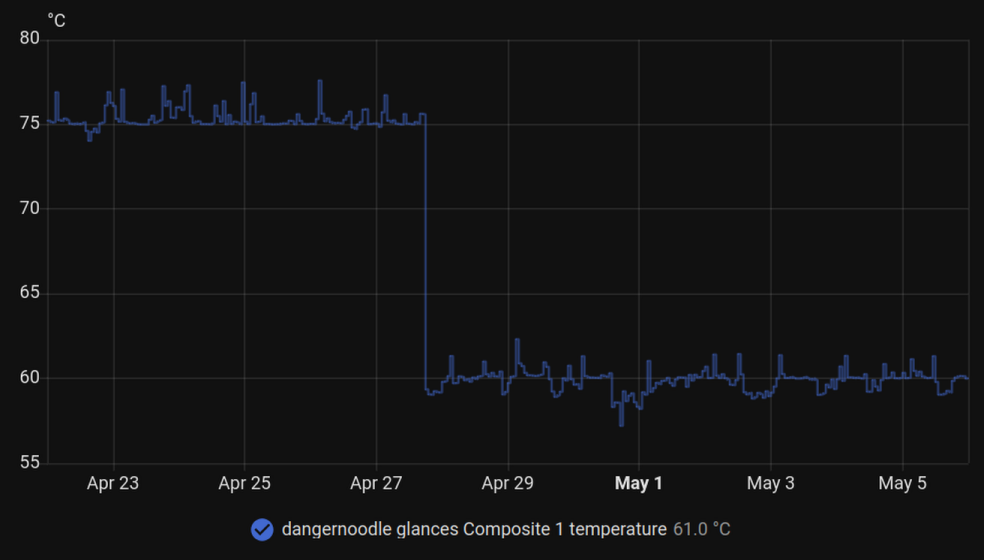
Before: 75.5°C. After: 60°C.
What I Did Not Do
I did not repaste. I did not open the chassis. I did not touch the BIOS. Buy fan, plug in, done.
If you are already planning to repaste, do that first. Fresh thermal compound will outperform any external fan. But if you are not comfortable tearing down the system, or if you want to see how much a passive airflow improvement buys you before committing to a full teardown, a USB fan is a legitimate first step.
For a few dollars and two minutes of setup, the MS-01 runs noticeably cooler.